Field Guide Nº 01 · The Builder's Stack

32 tools,
explained like
you're five.

JavaScript to LangGraph, npm to CI/CD — what each piece is, what it does, how it actually works under the hood, and how they all plug into each other. 🌾✨

How to read → start with the Restaurant 🍽️, scan the Map 🗺️, dive into any chapter.
Every card → ELI5 · Under the hood · Real snippet · Gotcha · Cousins
Edition → October 2026
Prologue

The whole stack is a restaurant 🍽️

Before any detail, hold this one picture in your head. Every tool in this guide has a job in the same kitchen. If you forget what something does, ask: "who is it in the restaurant?"

📜
JavaScript · TypeScript · Python

The recipe languages

The languages recipes are written in. TypeScript is JavaScript with labels on every jar.

🔥
Node.js · Bun

The stove

The thing that actually cooks JavaScript recipes outside the browser.

🚚
npm · npx · pip / uv · venv

The suppliers

Deliver ingredients (packages) from a giant market. npx borrows a tool for one job; a venv is each Python project's own spice rack.

🔪
Vite

The prep station

Chops, preps and plates at lightning speed while you're still developing.

🍱
React

The plating system

Builds what the guest sees out of reusable pieces.

🏪
Next.js

The whole dining room

React plus menu, waiters, tables and the front door — a complete restaurant.

🧾
FastAPI

The order counter

Where the Python kitchen takes orders — strictly, quickly, with a printed menu.

🛎️
API · Webhook

Order window + doorbell

The API is the window you pass orders through. A webhook is the kitchen ringing your bell when it's ready.

🏦
Supabase

Pantry + bouncer + mailroom

Storage, ID checks at the door, and live announcements — rented as one building.

🍷
Vector DB

The sommelier

Finds things by taste: "something smoky, like last Tuesday's" — not by exact name.

🔌
LangChain

Universal appliance adapters

Any AI model, any database, same plug.

👩‍🍳
LangGraph

The head chef's flowchart

Taste → adjust → taste again. Loops, decisions, memory.

♻️
Loops · Graphs in AI

The tasting habit

Taste, adjust, taste again — the loop every agent runs. Graphs are the map of what happens next.

🏅
Evals

The food critic

Scores 200 dishes so you know the new recipe is truly better.

📈
OpenBB

The market scout

Brings back prices from every market stall, translated into one language.

🎫
JSON · JSONC · YAML

Order tickets

Same information, three handwriting styles — strict, annotated, or tidy-indented.

🔍
CI/CD · GitHub Actions

Inspector + delivery robot

Tastes every new tray automatically, and ships it only if it passes.

📦
Docker · Kubernetes

Meal kits + franchise manager

Docker seals each dish in a box that cooks the same anywhere. Kubernetes keeps the right number of kitchens open.

🌍
VPS · CDN

Rented kitchen + pickup lockers

A VPS is your own kitchen in a shared building. A CDN stocks lockers in every neighbourhood so food arrives fast.

The Map

How everything connects 🗺️

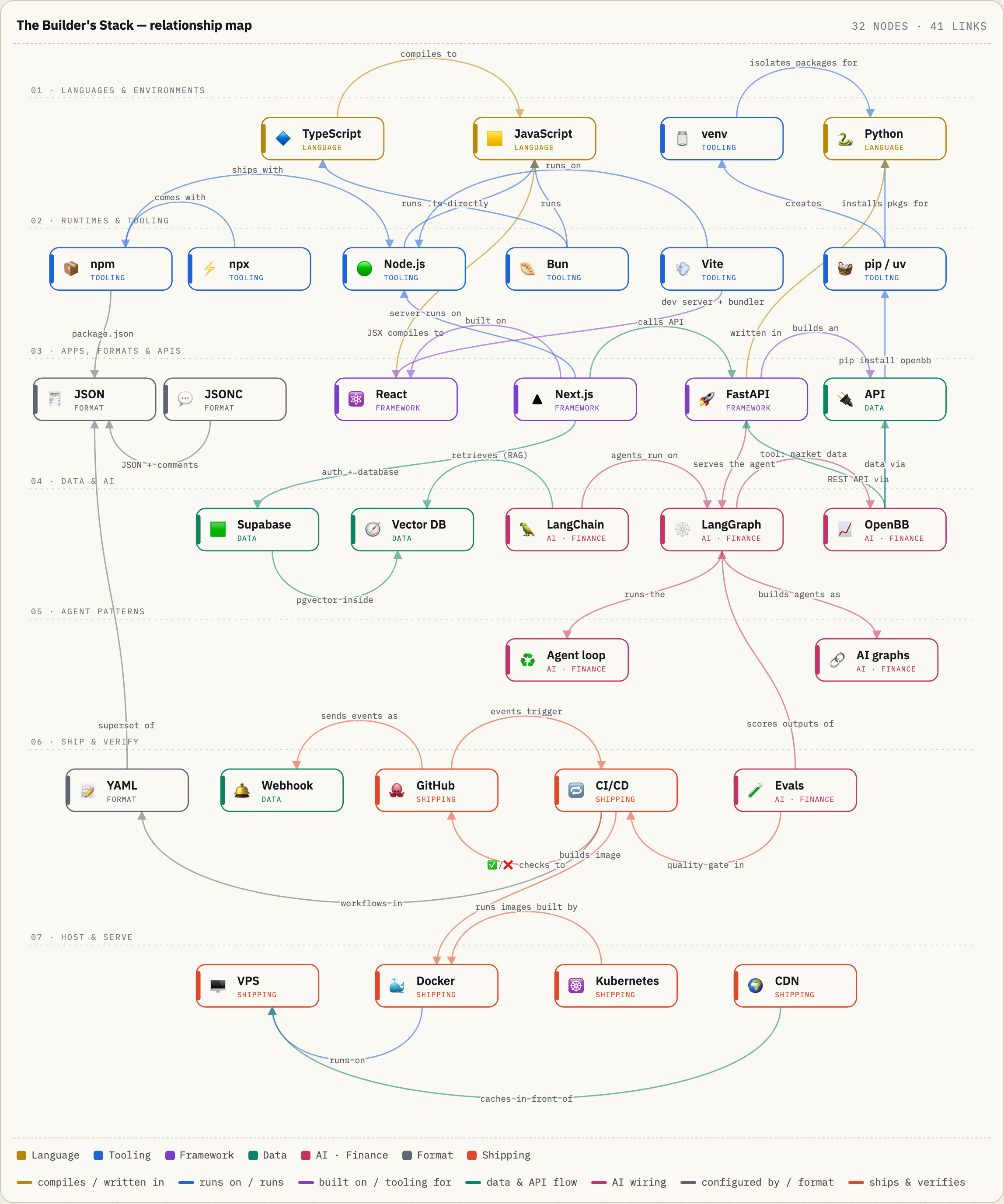
Read it top to bottom: languages → tools that run them → apps you build → data & AI → shipping → hosting. Tap or hover any box to light up its relationships. Arrows read as a sentence: TypeScript → compiles to → JavaScript.

The Builder's Stack — relationship map
Relationship map of the technologies, grouped in rows from languages through AI to shipping and hosting, with labelled arrows between them

↔ Swipe sideways to explore the map · tap a box for details

Chapter I

The languages 🗣️

Everything else in this guide is either written in these, runs these, or ships these.

01
🟨

JavaScript

The only programming language every web browser speaks natively.

Language
ELI5 🧸

A web page is a puppet show. HTML is the puppets, CSS is their costumes, and JavaScript is the hand inside that makes them move, talk and react when you poke them.

Under the hood 🔧

  • Engines: every browser ships a JS engine — V8 (Chrome), SpiderMonkey (Firefox), JavaScriptCore (Safari) — that compiles your text into machine code just in time, while it runs.
  • One cook, never idle: JS is single-threaded with an event loop. It puts the kettle on (network request), chops onions meanwhile, and comes back when the kettle whistles. That's what async/await and Promises express.
  • Dynamic typing: a variable can hold a number now and a string later. Flexible for small scripts, chaos in big codebases — which is why TypeScript exists.
  • Standardised as ECMAScript, with a new edition every year. "ES modules" (import/export) are the modern way to split code into files.
const greet = name => `Hi ${name} 👋`;

async function price(t) {
  const r = await fetch(`/api/quote/${t}`);
  return r.json();   // waits without freezing the page
}
⚠️ Gotcha"Java" and "JavaScript" are related like "car" and "carpet". Also: "5" + 1 is "51" but "5" - 1 is 4. Loose typing bites.
CousinsTypeScriptWebAssemblyDartPython (server side)
02
🔷

TypeScript

JavaScript + a type system. A spell-checker for code that runs before the code does.

Language · superset
ELI5 🧸

JavaScript lets you pour soup into a paper bag. TypeScript puts a label on every container — "liquids only" — and shouts before you pour, not after the mess. 🥣

Under the hood 🔧

  • Write → check → erase: you write .ts, the compiler (tsc) checks every type, then strips the types out and emits plain JavaScript. Browsers never see TypeScript.
  • Zero runtime cost, zero runtime protection: types vanish after compiling. Data arriving from an API can still be wrong — that's why validators like Zod (TS) or Pydantic (Python) exist.
  • Structural typing: if it has the right shape, it fits. No need to declare "this implements that".
  • Configured by tsconfig.json — which happily accepts comments, so it's really a JSONC file wearing a JSON name tag.
  • Getting faster: Bun and modern Node can run simple .ts files directly by stripping types, and TypeScript 7 (GA July 2026) is a Go rewrite of the compiler with roughly 10× faster type-checking.
type Trade = { ticker: string; qty: number };

function buy(t: Trade) { /* … */ }

buy({ ticker: "NVDA", qty: "ten" });
// ✗ Type 'string' is not assignable to type 'number'
// caught in your editor — before anything runs
⚠️ GotchaTypes are a promise you make about data, not a guard on data from the internet. Validate at the edges.
CousinsJSDoc typesFlow (fading)Python type hints
03
📄

.ts vs .tsx

Same language. .tsx simply also allows JSX — HTML-looking tags inside code.

File formats
ELI5 🧸

A .ts file is a recipe written only in words. A .tsx file is a recipe that also contains little drawings of how the plate should look. 🍱

Under the hood 🔧

  • JSX is a syntax extension: <Button label="Buy" /> inside code. It compiles down to plain function calls that build UI. React made it famous.
  • Why two extensions? Old TypeScript cast syntax <string>value looks identical to a JSX tag. The extension tells the compiler which grammar to read. In .tsx you write value as string instead.
  • Rule of thumb: file returns UI → .tsx. Utilities, API clients, types, server logic → .ts.
  • The extension zoo: .js · .jsx · .mjs (ES module) · .cjs (old CommonJS) · .mts/.cts · .d.ts = type declarations only, the menu description without the food.
type Props = { ticker: string; price: number };

export function PriceTag({ ticker, price }: Props) {
  return <span>{ticker}: ${price.toFixed(2)} 📈</span>;
}
export const usd = (n: number) =>
  new Intl.NumberFormat("en-US",
    { style: "currency", currency: "USD" }).format(n);
⚠️ Name clashtsx is also a popular CLI tool (npx tsx script.ts) that runs TypeScript instantly. Same name, different thing.
Chapter II

The engines 🔥

JavaScript was born in the browser. Runtimes let it live everywhere else — your Mac, a server, a CI robot.

04
🟢

Node.js

JavaScript let out of the browser. A runtime for JS on computers and servers.

Runtime
ELI5 🧸

JavaScript was a fish that could only live in the browser's aquarium. Node.js gave it lungs — now it can walk around your computer, read files, open ports and talk to databases. 🐟→🦎

Under the hood 🔧

  • Recipe: Chrome's V8 engine + libuv (the event loop; OS-level async for network, plus a thread pool for files, DNS and some crypto) + built-in modules like fs, http, crypto.
  • Non-blocking I/O: one waiter serves 1,000 tables because he never stands in the kitchen waiting. Perfect for APIs, chat, streaming, MCP servers.
  • Weak spot: heavy CPU math (image processing, ML) blocks the single waiter. Use worker threads — or hand it to Python/Rust.
  • Versions: up to Node 26, even-numbered releases became LTS (long-term support). From Node 27 there is one major a year, and each becomes LTS. Use LTS for anything you care about.
import http from "node:http";

http.createServer((req, res) => {
  res.end("hello from Node 🟢");
}).listen(3000);

// $ node server.mjs   → http://localhost:3000
Use it whenyou want the safest, most compatible JS runtime — every library, host and CI provider supports it.
CousinsBunDenoCloudflare Workers
05
🥟

Bun

An all-in-one JavaScript toolkit: runtime + package manager + bundler + test runner.

Runtime · toolkit
ELI5 🧸

With Node.js you buy the oven, fridge and knives from different shops. Bun is one gadget that is all of them — and it's surprisingly quick. 🔪🍳❄️

Under the hood 🔧

  • Different engine: written in Zig, built on Safari's JavaScriptCore instead of V8. Fast startup is a design goal.
  • Batteries included: runs .ts/.tsx natively, built-in SQLite, test runner, bundler, .env loading.
  • Node-compatible by design: reads package.json, installs from the npm registry, implements most Node APIs — so most packages just work.
  • bun install is famously fast thanks to a global cache and aggressive parallelism.
$ bun install          # like npm install, faster
$ bun run dev          # run a package.json script
$ bun test             # built-in test runner
$ bun agent.ts         # run TypeScript directly
$ bunx cowsay hi       # Bun's npx
⚠️ GotchaCompatibility is high, not 100%. Native addons or obscure Node APIs can still bite. If something breaks oddly, test it under Node.
CousinsNode.jsDenopnpm
Chapter III

The suppliers 📦

Nobody writes everything from scratch. Package managers fetch other people's code — safely, repeatably, with exact versions.

06
📦

npm

Node Package Manager — the giant public registry and the CLI that downloads from it.

Package manager
ELI5 🧸

npm is the supermarket and the delivery van. package.json is your shopping list, node_modules is your pantry, and package-lock.json is the receipt listing exact brands and sizes — so tomorrow's delivery is identical. 🛒

Under the hood 🔧

  • Registry: millions of packages live at registry.npmjs.org. Comes bundled with Node.js.
  • Dependency tree: your 5 packages depend on 50 others, which depend on 500. npm resolves the whole tree and flattens it into node_modules.
  • Semver: "^1.4.2" means "any 1.x at or above 1.4.2". Major version bump = breaking change.
  • npm ci = clean install exactly from the lockfile. It's what CI uses, so every run is reproducible.
  • Scripts: the "scripts" section of package.json is your project's control panel — npm run dev, npm test, npm run build.
{
  "name": "agent-desk",
  "scripts": {
    "dev": "next dev",
    "test": "vitest run"
  },
  "dependencies":    { "next": "^16.0.0" },
  "devDependencies": { "typescript": "^5.6.0" }
}
⚠️ Supply-chain riskPackages can run install scripts. 2025 had several high-profile hijacked-package incidents. Commit your lockfile, read its diffs, and prefer well-maintained packages.
Cousinspnpmyarnbun installpip / uv (Python)
07
⚡

npx

"npm execute" — run a package's command without installing it permanently.

Package runner
ELI5 🧸

npm install is buying a drill and keeping it in your garage. npx is borrowing the neighbour's drill for one job and handing it back. 🔧

Under the hood 🔧

  • Lookup order: first checks your project's node_modules/.bin; if missing, downloads the package into a cache, runs its command, done.
  • Ships with npm — if you have Node, you have npx.
  • Perfect for one-shots: project generators (create-next-app, create-vite) and tools you run occasionally.
  • How many MCP servers launch: an AI client spawns npx -y some-mcp-server, where -y auto-answers "install this?".
$ npx create-next-app@latest my-app
$ npx tsc --noEmit         # type-check only
$ npx -y @modelcontextprotocol/server-filesystem ~/Notes
$ npx prettier --write .
⚠️ GotchaYou're executing code fetched from the internet. For anything that touches your files, pin a version: tool@1.2.3, not @latest.
Cousinsbunxpnpm dlxuvx (Python)pipx
Chapter IV

Building the screen ⚛️

React is the bricks. Next.js is the furnished house. Vite is the power tools in the workshop.

08
⚛️

React

A library for building user interfaces out of reusable components.

UI library
ELI5 🧸

LEGO for screens. Build a Button brick once, snap it in everywhere. When your data changes, React rebuilds only the bricks that changed — not the whole castle. 🧱

Under the hood 🔧

  • Components are functions that return JSX. Props are inputs from the parent (like function arguments). State is the component's own memory.
  • The render cycle: state changes → React re-runs the function → compares new output to old (reconciliation, the "virtual DOM" diff) → patches only the real differences on screen.
  • Hooks attach memory and side-effects to plain functions: useState, useEffect, useMemo, useRef.
  • Server Components: parts that render on the server and ship zero JavaScript to the browser — only interactive bits get hydrated.
  • Declarative: you describe what the screen should look like for a given state; React figures out how to get there.
import { useState } from "react";

export function Counter() {
  const [n, setN] = useState(0);
  return (
    <button onClick={() => setN(n + 1)}>
      Clicked {n} times 🎉
    </button>
  );
}
⚠️ GotchaReact is only the UI layer — no routing, no server, no build step. That's exactly the gap Next.js and Vite fill.
CousinsVueSvelteSolidJSAngular
09
▲

Next.js

A full-stack React framework (by Vercel): routing, server rendering, APIs — in one project.

Framework
ELI5 🧸

React gives you LEGO bricks. Next.js gives you the bricks plus the baseplate, the instruction booklet, and a shop window to display the finished model to the world. 🏪

Under the hood 🔧

  • File-based routing: app/about/page.tsx automatically becomes /about. Folders are URLs.
  • Rendering menu: 🍳 SSR — cook on order per request · 🥫 SSG — pre-cooked at build time · 🔄 ISR — pre-cooked, refreshed every N seconds · 🧑‍🍳 Client — assembled at the table.
  • Server Components & Server Actions: fetch data and mutate the database directly from components, no separate API needed.
  • Route Handlers: app/api/…/route.ts gives you backend endpoints inside the same repo.
  • Its own bundler: Turbopack (Rust). Runs anywhere Node runs — Docker, your Mac Studio — not just on Vercel.
// a Server Component: runs on the server
export default async function Page(
  { params }: { params: Promise<{ ticker: string }> }
) {
  const { ticker } = await params;
  const q = await fetch(`http://api:8000/quote/${ticker}`)
              .then(r => r.json());
  return <h1>{ticker} · {q.price} 📈</h1>;
}
⚠️ GotchaLots of magic. Caching defaults have changed across major versions and confused many people — when data looks stale, suspect the cache first.
CousinsReact RouterAstroSvelteKitNuxtTanStack Start
10
💨

Vite

A lightning-fast dev server and build tool for frontend projects. French for "fast" — say "veet".

Build tool
ELI5 🧸

Old tools re-glued your entire scrapbook every time you changed one sticker. Vite only hands the browser the page you're looking at, and swaps a sticker the instant you edit it. 📒✨

Under the hood 🔧

  • Dev mode: serves your source files as native ES modules. The browser requests only what it needs; edits hot-swap via HMR in milliseconds, without losing page state.
  • Build mode: bundles, minifies and tree-shakes (drops unused code) for production. Since Vite 8, a single Rust-based bundler, Rolldown, does this.
  • Framework-agnostic: React, Vue, Svelte, Solid. It also powers other frameworks (SvelteKit, Astro, Nuxt, React Router) and the Vitest test runner.
  • Created by Evan You, who also made Vue.
$ npm create vite@latest dash -- --template react-ts
$ cd dash && npm install
$ npm run dev     # → http://localhost:5173, instant HMR
$ npm run build   # → optimized files in dist/
Vite vs Next.js 🤔Vite = workshop power tools: build a single-page app and add routing/backend yourself. Ideal for dashboards, internal and local-first tools. Next.js = furnished house with its own tools: pick it for SEO-heavy, server-rendered sites.
CousinsTurbopackwebpack (veteran)esbuildRspackParcel
Chapter V

The Python kitchen 🐍

AI lives in Python — PyTorch, MLX, LangGraph, OpenBB. Python is the language, a venv keeps each project's packages separate, and FastAPI is the shortest path from "my Python function" to "an API my app can call".

11
🐍

Python

A readable, batteries-included language. The default language of AI, data science and automation.

Language
ELI5 🧸

Python reads almost like a recipe written in plain English. Indentation is the recipe's layout — steps that belong together are indented together. And the kitchen comes fully stocked: files, dates, web requests and maths are all in the drawer before you buy anything. 📖🍳

Under the hood 🔧

  • CPython (the standard interpreter) compiles your .py file to bytecode, then a virtual machine runs it line by line. No separate build step.
  • Indentation is syntax: blocks are defined by spaces, not braces. Tidy code isn't optional — it's the grammar.
  • Dynamic typing, optional hints: def f(x: int) -> str isn't enforced at runtime, but type checkers (mypy, pyright) and frameworks (FastAPI, Pydantic) use it.
  • The GIL: historically only one thread runs Python bytecode at a time. A free-threaded build without it became officially supported in 3.14 (2025), but it's opt-in.
  • Ecosystem: packages come from PyPI, installed with pip or uv into a virtual environment. NumPy, PyTorch, pandas and most AI libraries are Python-first.
from statistics import mean

def summary(prices: list[float]) -> str:
    change = (prices[-1] / prices[0] - 1) * 100
    return f"avg {mean(prices):.2f}, {change:+.1f}%"

print(summary([101.2, 99.8, 104.5]))
# avg 101.83, +3.3%
⚠️ Mutable defaultsdef add(item, bag=[]) creates the list once, when the function is defined — every call shares it. Use bag=None and create the list inside.
CousinsJavaScript / TypeScriptJuliaRGoMojo
12
🫙

Python venv

A virtual environment: a private folder of packages for one project, so projects never fight over versions.

Environment tool
ELI5 🧸

Every project gets its own spice rack. Project A needs the old paprika, project B the new one — each rack holds exactly what its recipe needs, and nobody raids the shared kitchen cupboard (your system Python). 🫙🌶️

Under the hood 🔧

  • It's just a folder (usually .venv/) with its own site-packages, a bin/python pointing at the interpreter that made it, and a small pyvenv.cfg.
  • Activating puts .venv/bin first on your PATH, so python and pip mean this project's copies. You can also skip activation and call .venv/bin/python directly.
  • Same Python version as its creator: a venv isolates packages, not the interpreter. To pin a version, use a tool that installs Pythons (uv python install, pyenv).
  • uv does it for you: uv sync reads pyproject.toml + uv.lock, creates .venv and installs the exact versions. uv sync --locked is the Python equivalent of npm ci.
  • JS comparison: node_modules is a per-project folder by default; Python needed venvs to get the same isolation.
# the built-in way
python3 -m venv .venv
source .venv/bin/activate      # Windows: .venv\Scripts\activate
pip install fastapi uvicorn

# the modern way (creates .venv automatically)
uv init desk && cd desk
uv add fastapi uvicorn
# write main.py (see the FastAPI card), then:
uv run uvicorn main:app --reload
⚠️ “externally-managed-environment”Recent Homebrew, Debian and Ubuntu Pythons refuse a global pip install (PEP 668). That error is the system telling you to use a venv. Also: add .venv/ to .gitignore — venvs aren't portable between machines.
CousinsuvvirtualenvcondapyenvPoetrynode_modules (JS)
13
🚀

FastAPI

A modern Python framework for building web APIs from type-hinted functions.

Backend framework
ELI5 🧸

A restaurant counter with a strict but friendly waiter. You write the menu with type hints; the waiter checks every order, politely rejects nonsense ("quantity: banana"), and prints a beautiful menu card for customers — automatically. 🧾

Under the hood 🔧

  • Two foundations: Starlette (async web toolkit) + Pydantic (data validation from type hints).
  • Type hints do the work: declare days: int = 30 and FastAPI parses, validates, converts, and returns a clear 422 error on bad input.
  • Free docs: generates an OpenAPI schema and interactive docs at /docs — you can call your API from the browser.
  • Async-native: async def endpoints handle many slow I/O calls (LLMs, databases, data providers) concurrently.
  • Runs on an ASGI server, usually Uvicorn.
from fastapi import FastAPI

app = FastAPI()

@app.get("/quote/{ticker}")
async def quote(ticker: str, days: int = 30):
    return {"ticker": ticker.upper(), "days": days}

# $ uvicorn main:app --reload
# open http://localhost:8000/docs  ✨
Use it whenyou need to expose a local model, an agent, or a data pipeline to a frontend, n8n, or another service.
CousinsFlaskDjangoLitestarExpress / Hono (JS)
Chapter VI

How programs talk 📡

Your Next.js app asks the Python brain for an answer; Stripe tells your server a payment cleared. Two directions, one language: HTTP + JSON.

14
🔌

API

Application Programming Interface — the agreed menu of requests one program can make to another.

Concept · contract
ELI5 🧸

A restaurant's order window. You don't walk into the kitchen; you read the menu, pass a slip through the window (“2 × soup, no salt”), and get a dish — or a polite “sorry, we're out”. The menu is the API: what you can ask for, how to ask, and what comes back. 🪟🍜

Under the hood 🔧

  • Web APIs speak HTTP: a request is method + URL + headers + body; a response is a status code + headers + body, usually JSON.
  • Verbs: GET read · POST create · PUT/PATCH update · DELETE remove. REST organises an API around resources (/orders/42) and these verbs.
  • Status codes: 2xx worked · 4xx you asked wrong (401 who are you? 404 no such thing, 429 slow down) · 5xx the server broke.
  • Auth: an API key or a bearer token in a header; OAuth when a user grants an app access on their behalf.
  • The contract: an OpenAPI spec describes every endpoint — FastAPI generates one for you, and clients, docs and AI tools can be generated from it.
curl -si https://api.example.com/v1/quotes/NVDA \
  -H "Authorization: Bearer $API_KEY"

# HTTP/1.1 200 OK
# content-type: application/json
{ "ticker": "NVDA", "price": 181.4, "currency": "USD" }
⚠️ Keys are passwordsNever put an API key in frontend code or a public repo — anyone can read it. Keep it server-side in an environment variable, and respect rate limits (back off and retry on 429).
StylesRESTGraphQLgRPCWebSocketMCP (for AI tools)SDKs (an API wrapped in a library)
15
🛎️

Webhook

An API call in reverse: when something happens, the other service calls your URL to tell you.

Pattern
ELI5 🧸

Instead of phoning the bakery every five minutes to ask “is my cake ready?” (polling), you leave your number and they ring your doorbell the moment it's done. A webhook is that doorbell: you give a service a URL, and it knocks when there's news. 🛎️🎂

Under the hood 🔧

  • Register a URL (and usually a secret) with the provider: GitHub for pushes, Stripe for payments, Supabase for database changes.
  • Event → HTTP POST: when it fires, the provider sends a JSON body describing what happened to your endpoint.
  • Verify the sender: the provider signs the body with your secret (an HMAC, e.g. GitHub's X-Hub-Signature-256). Recompute it and compare — otherwise anyone can fake an event.
  • Answer fast: return 2xx within seconds (GitHub waits 10s), then do the slow work in the background.
  • Expect duplicates: many providers retry failed deliveries (Stripe keeps trying for up to 3 days); GitHub doesn't auto-retry, but you can redeliver by hand. Either way, store each event ID (GitHub: X-GitHub-Delivery) and skip repeats (idempotency).
import hmac, hashlib, os
from fastapi import FastAPI, Request, HTTPException

app = FastAPI()
SECRET = os.environ["WEBHOOK_SECRET"].encode()

@app.post("/hooks/github")
async def github(req: Request):
    body = await req.body()      # raw bytes!
    mac = hmac.new(SECRET, body, hashlib.sha256)
    sig = "sha256=" + mac.hexdigest()
    got = req.headers.get("x-hub-signature-256", "")
    if not hmac.compare_digest(sig, got):
        raise HTTPException(401)
    # queue the work, reply right away
    return {"ok": True}
Testing locallyYour laptop isn't on the internet, so providers can't reach localhost. Use a tunnel (ngrok, cloudflared) or a provider CLI like stripe listen to forward events. This is also how a GitHub push wakes up external CI like Jenkins or Buildkite.
CousinsPollingWebSocketsServer-Sent EventsMessage queuesrepository_dispatch
Chapter VII

JSON · JSONC · YAML — three handwritings 🧾

All three describe the same thing: structured data — keys, values, lists, nesting. They differ in strictness and in who they're written for: machines, or humans.

🧾

JSON

JavaScript Object Notation · the strict one

A form filled in with a ruler. Every box exactly where expected — one stray mark and the machine rejects it.
{
  "agent": "miriya",
  "model": "qwen3",
  "tickers": ["NVDA", "AAPL"],
  "paper": true
}
  • Keys in "double quotes", always
  • No comments, no trailing commas
  • Parsed by every language on earth
  • Used for: API payloads, package.json, n8n workflow exports
💬

JSONC

JSON with Comments · the annotated one

The same ruled form — but now you're allowed to scribble notes in the margin.
{
  // which persona to load
  "agent": "miriya",
  "model": "qwen3", /* local via MLX */
  "tickers": ["NVDA", "AAPL"],
  "paper": true,  // trailing comma: VS Code ok,
                  // not every parser
}
  • // and /* */ comments allowed
  • Popularised by VS Code; a spec exists, but tools vary (e.g. on trailing commas)
  • Used for: tsconfig.json, VS Code settings.json, devcontainer.json
  • ⚠️ Strict JSON.parse() chokes on it
📝

YAML

"YAML Ain't Markup Language" · the human one

A neatly indented grocery list — lovely to read, but one wrong indent and "milk" ends up under "garden tools".
# which persona to load
agent: miriya
model: qwen3
tickers:
  - NVDA
  - AAPL
paper: true
  • Indentation is the structure (spaces only, never tabs)
  • # comments, multi-line strings, anchors to reuse blocks
  • Used for: GitHub Actions, Docker Compose, Kubernetes, OpenAPI
  • YAML 1.2 is a superset of JSON — valid JSON is valid YAML
🤖↔🤖
Machines talking to machines → JSON. Fast, unambiguous, universal.
🧑‍💻
Config a human edits in an editor that understands it → JSONC.
🏗️
Pipelines & infrastructure → YAML. It's what CI/CD and containers expect.
🇳🇴
YAML trap — "the Norway problem": in older YAML 1.1 parsers country: NO became false, and version: 1.10 becomes the number 1.1. Quote strings when in doubt.
🐍
Bonus cousin — TOML: pyproject.toml, Cargo.toml. INI-style, typed, no indentation traps.
Chapter VIII

Memory & data 🗄️

Where your app keeps facts — and where your AI keeps meaning.

16
🟩

Supabase

An open-source backend-in-a-box built around PostgreSQL. The "Firebase alternative".

Backend platform
ELI5 🧸

Instead of building your own vault, ID-checking guard, mailroom and loudspeaker, you rent a building that already has all four — and the blueprints are public, so you can build your own copy at home. 🏦

What's inside 🔧

  • 🐘 Postgres: a real, full relational database — SQL, joins, transactions, extensions.
  • 🔐 Auth: email, magic links, OAuth (Google, GitHub…), issuing tokens your app trusts.
  • ⚡ Instant APIs: REST (via PostgREST) and GraphQL generated straight from your tables.
  • 📡 Realtime (subscribe to row changes) · 🗂️ Storage (files) · 🌍 Edge Functions (TypeScript on Deno).
  • 🧭 pgvector: turns Postgres into a vector database — embeddings live next to your normal data.
  • 🛡️ Row Level Security (RLS): rules inside the database decide who can see which row. It's what makes talking to the DB straight from the browser safe — when configured right.
  • 🏠 Local-first: supabase start runs the whole stack in Docker on your machine; fully self-hostable.
const { data, error } = await supabase
  .from("trades")
  .select("ticker, qty, price")
  .eq("ticker", "NVDA")
  .order("created_at", { ascending: false });
⚠️ GotchaA table without RLS policies, exposed through the API, is effectively public. And never ship the service_role key to a browser — it bypasses every rule.
CousinsFirebasePocketBaseAppwriteNeonConvex
17
🧭

Vector Database

A database that stores meaning as numbers and finds things by similarity, not exact match.

Database type
ELI5 🧸

A normal library sorts books alphabetically. A vector library sorts them by vibe — every book gets a spot on a giant map, so "sad songs about rain" lands right next to "melancholy ballads about storms", even with zero words in common. 🗺️🎵

Under the hood 🔧

  • 1 · Embed: an embedding model (e.g. nomic-embed-text via Ollama) turns a chunk of text into a vector — a list of hundreds to thousands of numbers that encode its meaning.
  • 2 · Store: the vector is saved with the original text and metadata (source, date, ticker…).
  • 3 · Query: your question is embedded the same way; the DB returns its nearest neighbours by cosine similarity.
  • 4 · Index for speed: comparing against millions of vectors is slow, so indexes like HNSW (layered "highways" between neighbours) or IVF (cluster buckets) find approximately nearest neighbours — a tiny accuracy trade for a massive speed gain.
  • Main job — RAG: retrieve the most relevant chunks, paste them into the LLM's prompt, so the model answers from your documents instead of guessing.
create extension vector;

create table notes (
  id bigserial primary key,
  body text,
  embedding vector(768)
);

-- 5 notes closest in meaning to the query
select body from notes
order by embedding <=> $1   -- cosine distance
limit 5;
⚠️ GotchaRetrieval quality is mostly about chunking, the embedding model, and hybrid search (keywords + vectors) — far more than which database brand you pick.
OptionspgvectorLanceDB (embedded)sqlite-vecChromaQdrantWeaviateMilvusPinecone
Chapter IX

The AI brains 🧠

LangChain connects the parts. LangGraph conducts them over time. Evals tell you whether the music is actually any good.

18
♻️

Loops in AI

The repeat-until-done cycle at the heart of every agent: think → act → observe → think again.

Concept · pattern
ELI5 🧸

A chef tasting soup. Taste → too bland → add salt → taste again → good → serve. A chatbot answers once; an agent keeps looping — using tools and checking results — until the job is done or it's told to stop. 🍲🔁

Under the hood 🔧

  • The agent loop: send the model the conversation + a list of tools → it either answers, or asks to call a tool → your code runs the tool → the result is appended → repeat.
  • ReAct (reason + act, 2022) is the classic name for this pattern; tool calling in modern model APIs is built for it.
  • Stop conditions: a final answer, a max number of steps, a cost or time budget, or a human-in-the-loop approval before anything risky.
  • Other loops: reflection (draft → critique → revise), evaluator–optimiser (one model grades, another improves), and the training loop (predict → measure loss → adjust weights → repeat, millions of times).
  • Context grows every turn: long loops need summarising or trimming old steps so the model doesn't run out of room.
messages = [{"role": "user", "content": question}]

for step in range(10):                  # hard cap!
    reply = llm.invoke(messages, tools=TOOLS)
    messages.append(reply)
    if not reply.tool_calls:              # model is done
        break
    for call in reply.tool_calls:          # act
        result = TOOLS[call.name](**call.args)
        messages.append(tool_result(call, result))  # observe

print(messages[-1].content)
⚠️ Runaway loopsAn agent that keeps calling the same failing tool burns money and time. Always cap steps and budget, log every step, and use evals to catch loops that wander. LangGraph manages this loop for you.
CousinsReActReflexionPlan-and-executeClaude Agent SDKOpenAI Agents SDKTraining loop
19
🔗

Graphs in AI

Dots joined by arrows — used to orchestrate agents, store knowledge, and even to train models.

Concept · data structure
ELI5 🧸

A metro map. Stations are nodes, tracks are edges. In AI, the same picture shows up three ways: a flowchart of steps an agent walks through, a map of facts (“Nvidia → makes → GPUs”), and the hidden wiring a model uses to learn. 🚇🗺️

Three kinds of graph 🔧

  • Workflow graphs: nodes are steps (call a model, run a tool), edges say what comes next. A DAG (no cycles) is a fixed pipeline; allowing cycles gives you loops. This is LangGraph's model.
  • Knowledge graphs: facts stored as entity → relation → entity triples in a graph database like Neo4j, queried with Cypher. Good at “how is X connected to Y?”, which similarity search struggles with.
  • GraphRAG: an LLM extracts a knowledge graph from your documents, then retrieves along its links and community summaries — better for broad “what are the themes?” questions than plain vector RAG.
  • Computation graphs: PyTorch records every operation as a graph so it can run it backwards to compute gradients — how a model learns.
  • Graph neural networks learn directly on graph data: molecules, social networks, fraud rings.
// store facts
MERGE (n:Company {name:"Nvidia"})
MERGE (t:Company {name:"TSMC"})
MERGE (t)-[:SUPPLIES]->(n);

// ask a connected question
MATCH (s)-[:SUPPLIES]->(:Company {name:"Nvidia"})
RETURN s.name    // → "TSMC"
You're looking at oneThis guide's relationship map is a graph: technologies are nodes, the labelled arrows are edges, and the build script validates it like any graph — no dangling edges, no orphan nodes.
ToolsLangGraphNeo4jMicrosoft GraphRAGLightRAGNetworkXPyTorch Geometric
20
🦜

LangChain

A framework (Python & JS/TS) for building LLM apps from standard, swappable parts.

LLM framework
ELI5 🧸

A universal adapter kit. Every AI model, database and tool has a different plug shape; LangChain gives them all the same socket — so you can swap Ollama for Claude, or Chroma for Qdrant, without rewiring the house. 🔌

The parts box 🔧

  • Chat models: one interface across OpenAI, Anthropic, Google, Ollama, MLX servers…
  • Prompts & structured output: templates in, validated objects out.
  • Document loaders & text splitters: PDFs, web pages, Notion, Markdown → clean chunks.
  • Embeddings, vector stores, retrievers: the full RAG plumbing.
  • Tools & agents: let the model call functions. Since v1.0, LangChain's agents are built on the LangGraph runtime — the two are layers of the same system.
  • LangSmith: the companion tracing & eval platform — see every prompt actually sent.
from langchain_ollama import ChatOllama
from langchain_core.prompts import ChatPromptTemplate

prompt = ChatPromptTemplate.from_template(
    "Summarise this filing in 3 bullets:\n{doc}")
llm = ChatOllama(model="qwen3")

chain = prompt | llm          # pipe = connect parts
chain.invoke({"doc": filing_text})
⚠️ Abstraction taxLayers can hide what's really sent to the model. Many builders use LangChain selectively (loaders, splitters, integrations) and call model APIs directly. Turn on tracing when debugging.
CousinsLlamaIndexHaystackDSPyPydantic AIVercel AI SDK
21
🕸️

LangGraph

Build stateful, multi-step, looping agents as graphs. From the LangChain team.

Agent orchestration
ELI5 🧸

A plain chain is a recipe: step 1, 2, 3, done. LangGraph is the flowchart on the kitchen wall: "taste the soup → too salty? add water and taste again → good? serve." It can loop, branch, pause and remember. 🍲🔁

Under the hood 🔧

  • State: a shared, typed notebook every step reads from and writes to.
  • Nodes: plain Python functions — call an LLM, run a tool, check a condition.
  • Edges: "where next?" Either fixed, or conditional (decided at runtime).
  • Cycles are allowed: think → act → observe → think again. That loop is what makes something an agent.
  • Checkpointer: saves state after every step → resume after a crash, rewind ("time travel") to debug, and human-in-the-loop: pause for your approval before, say, placing a trade 👀.
  • Multi-agent: nest graphs inside graphs; a supervisor routes work to specialists.
from langgraph.graph import StateGraph, START, END

g = StateGraph(DeskState)
g.add_node("research", research)   # pulls OpenBB data
g.add_node("decide", decide)       # LLM reasons
g.add_edge(START, "research")
g.add_edge("research", "decide")
g.add_conditional_edges("decide", route,
    {"need_more": "research", "done": END})  # 🔁 loop

app = g.compile(checkpointer=memory)
LangChain vs LangGraphLangChain = the instruments. LangGraph = the score that tells them when to play, repeat a bar, or wait for the conductor.
CousinsCrewAIAutoGen / AG2OpenAI Agents SDKClaude Agent SDKn8n AI AgentTemporal
22
🧪

Evals

Systematic tests for AI behaviour — how good is this model, prompt or agent, measured?

Practice · tooling
ELI5 🧸

A unit test is a maths quiz: 2 + 2 must equal 4, pass or fail. An eval is a cooking competition: many dishes are acceptable, so judges score taste, presentation and "did it follow the recipe?" — across 200 dishes, not one. 👨‍🍳🏅

Anatomy of an eval 🔧

  • Dataset: realistic inputs + what a good answer looks like (exact answer, or traits it must have).
  • Run: push every input through your system — the prompt, the RAG pipeline, the whole agent.
  • Graders: 🎯 exact match / regex · 🧮 code checks ("valid JSON?", "called the right tool?") · 🧑‍⚖️ LLM-as-judge with a rubric · 👀 human review.
  • Metrics: pass rate, faithfulness to retrieved context, tool accuracy, latency, cost per run.
  • Compare to baseline: swapping gemma for qwen? Evals tell you whether it got better or merely different.
  • In CI: a small eval suite on every PR that touches prompts; fail the build if the pass rate drops — a regression gate.
prompts: [file://prompts/summarise.txt]
providers:
  - ollama:chat:qwen3
  - ollama:chat:gemma3
defaultTest:          # keep the judge local too
  options: { provider: ollama:chat:qwen3 }
tests:
  - vars: { doc: file://filings/aapl.txt }
    assert:
      - type: contains
        value: "revenue"
      - type: llm-rubric
        value: "Exactly 3 bullets, no invented numbers"
⚠️ GotchaLLM judges have biases — they favour longer answers and their own style. Calibrate the judge against a few dozen human-labelled examples. Golden rule: build the eval before you tweak the prompt.
ToolspromptfooInspectDeepEvalRagasLangSmithBraintrustOpenAI Evals
Chapter X

The money lens 📈

Financial data is scattered across dozens of providers, each with its own format. OpenBB is the translator.

23
📈

OpenBB

Open-source financial data platform — one interface to many market-data providers, for analysts, quants and AI agents.

Data platform
ELI5 🧸

Every market stall speaks a different dialect and stacks its shelves differently. OpenBB is a translator who visits all of them and brings back the answers in one language, in one neat basket. 🌍🧺

Under the hood 🔧

  • Open Data Platform (ODP): the open-source core, a Python package (pip install openbb) exposing a single object, obb.
  • Provider-agnostic: the same call works across sources — swap provider="yfinance" for FMP, Polygon (now Massive), FRED, SEC… Some are free, some need your own API keys.
  • Coverage via extensions: equities, options, ETFs, crypto, currencies, macro, fixed income, news, filings.
  • Serve it anywhere: launch it as a REST API (FastAPI under the hood) → feed agents, dashboards, n8n, or Excel.
  • OpenBB Workspace: the company's commercial analyst UI with AI copilots, built on the same data layer. The old all-in-one "OpenBB Terminal" was split into the Platform (ODP) and a separate openbb-cli. Version 5 landed in late September 2026 with router changes — check the docs when upgrading.
from openbb import obb

df = obb.equity.price.historical(
    "NVDA", start_date="2026-01-01",
    provider="yfinance"
).to_df()

macro = obb.economy.fred_series("DGS10")  # 10Y yield · free FRED key

# $ pip install openbb-platform-api
# $ openbb-api   → REST at http://127.0.0.1:6900
Agent angle 🤖In a LangGraph trading desk, OpenBB is the "research" node's toolbox: the LLM decides what to look up, OpenBB fetches it consistently.
⚠️ GotchaData is only as good as the provider. Free feeds can be delayed or patchy, and licences limit redistribution — check before you build a product on top.
CousinsyfinanceQuantConnect / LEANBloomberg TerminalKoyfin
Chapter XI

CI/CD — the robot inspector 🔁

The deepest chapter: what it is, when it fires, why it lives on GitHub, and exactly how every test result gets recorded.

24
🔁

CI/CD

Continuous Integration / Continuous Delivery — every change is automatically built, tested and (optionally) shipped.

Practice
ELI5 🧸

A bakery with a robot inspector at the door. Every time any baker slides out a new tray, the robot tastes a cookie, checks the shape, and — if all's good — puts the tray on the shop shelf. One bad cookie? The tray stops, and the baker gets a note saying which cookie and why. 🍪🔍

The two letters 🔧

  • CI — Continuous Integration: merge small changes often; a robot builds and tests every push, so breakage is caught in minutes, not the week before release.
  • CD — Continuous Delivery: every passing build is ready to release; a human presses the button.
  • CD — Continuous Deployment: no button. Passes → goes live automatically.
  • The deal: you trade a few minutes of robot time per push for never again asking "who broke main?" 😌
The verdict is one number 🎯Every step is a shell command. It ends with an exit code: 0 = success ✅, anything else = failure ❌. Test runners exit non-zero when any test fails — that single number turns the whole pipeline red. Everything else (logs, reports, annotations) is the explanation.
CousinsGitLab CIJenkinsCircleCIBuildkiteBitbucket PipelinesForgejo / Gitea ActionsWoodpecker CIact (run Actions locally)

The pipeline, stage by stage 🏭

🔔
Triggerpush / PR / cron
📥
Checkoutclone the commit
📦
Installnpm ci · uv sync (cached)
🧹
Lint + typeseslint · tsc · ruff
🧪
Testvitest · pytest · evals
🏗️
Buildnext build · docker
🎭
Stagingdeploy + smoke test
🚀
Productionauto or one click

When does it trigger? 🔔 (the on: block of a GitHub workflow)

⬆️push

Code lands on a branch or a tag is created. Filter by branch (main) or path (src/**).

🔀pull_request

A PR is opened or updated. Results appear as checks on the PR — the most important trigger.

⏰schedule

Cron. UTC by default (9:00 Dubai = 0 5 * * *), or add timezone: "Asia/Dubai" next to cron. Can run a little late at busy times.

🖱️workflow_dispatch

A "Run workflow" button in the UI, or a call from the API/CLI — with typed inputs.

🌐repository_dispatch

An external webhook fires it — e.g. an n8n flow that kicks a build when news breaks.

🏷️release

A release is published → build artifacts, push the Docker image, deploy.

♻️workflow_call

One workflow reuses another, like calling a function.

💬issues · comments

Repo events — label an issue, react to a comment, run bots and triage.

Why does it run on GitHub? 🐙

CI isn't magic — it's a rented computer that wakes up when a webhook fires. It needs three things, and GitHub already has all three:

⚡
The moment

Every push and PR is an event GitHub sees first-hand.

📚
The code

The runner gets a short-lived token to clone that exact commit.

🪧
The scoreboard

✅/❌ appear right on the commit and PR, and can block merging.

Plus: free minutes for public repos and a monthly allowance for private ones, thousands of reusable actions in the Marketplace, and secrets that are auto-masked as *** in logs.

Where it physically runs: on a runner — a fresh VM GitHub spins up (ubuntu-latest, Windows, macOS) and destroys after the job, or a self-hosted runner on your own machine — e.g. a Mac Studio, so tests that need Apple Silicon and MLX run on real hardware. 🖥️

Anatomy of a workflow 🧬

A YAML file in .github/workflows/. Workflow → jobs (run in parallel) → steps (run in order).

name: CI
on:
  push: { branches: [main] }
  pull_request:
  schedule:
    - cron: "0 9 * * *"
      timezone: "Asia/Dubai"  # default is UTC
  workflow_dispatch:

jobs:
  test:
    runs-on: ubuntu-latest
    steps:
      - uses: actions/checkout@v5
      - uses: actions/setup-node@v5
        with: { node-version: 24, cache: npm }
      - run: npm ci
      - run: npx tsc --noEmit
      - run: npx vitest run --reporter=default --reporter=junit --outputFile.junit=report.xml
      - uses: actions/upload-artifact@v6
        if: always()     # upload even when tests fail!
        with: { name: test-report, path: report.xml }

How test cases get logged 📋

Seven layers, from raw text to a red line on your PR:

  1. stdout → step logThe test runner prints results. GitHub captures every line of every step, streams it live, timestamps it, and keeps it for a retention period (90 days by default, configurable).
  2. Exit code → verdictAny failing test → runner exits non-zero → step ❌ → job ❌ → red ✗ on the commit and the PR.
  3. JUnit XML → structured reportRunners can write a machine-readable file listing every test, its duration and failure message (pytest --junitxml=report.xml, Vitest/Jest junit reporters). Reporter actions turn it into a per-test pass/fail view.
  4. Annotations → inline on the diffA log line like ::error file=app.py,line=42::expected 4 becomes a comment pinned to that exact line in the PR.
  5. Job summary → readable pageMarkdown written to $GITHUB_STEP_SUMMARY renders as a neat table on the run's page.
  6. Artifacts → downloadable evidenceUpload reports, coverage HTML, screenshots, Playwright traces — downloadable from the run.
  7. Status checks → merge gateBranch protection can require the check to pass before anyone can merge. Coverage bots add a % comment.

What a failing run looks like 🔴

The raw step log — the first place to look:

 RUN  v4 /home/runner/work/agent-desk

 ✓ src/math.test.ts (3 tests) 4ms
 ✓ src/format.test.ts (5 tests) 9ms
 ✗ src/sizing.test.ts > caps position at 5%
   AssertionError: expected 0.062 to be
     less than or equal to 0.05
     ❯ src/sizing.test.ts:12:24

 Test Files  1 failed | 2 passed (3)
      Tests  1 failed | 8 passed (9)

Error: Process completed with exit code 1.
⚠️ CI safety rules• Pin third-party actions to a commit SHA, not a moving tag.
• Never run untrusted fork code with secrets (the pull_request_target trap).
• Scheduled workflows in public repos are auto-disabled after 60 days without repo activity.
• Debug locally first with act.
Chapter XII

Where it lives 🏗️

CI says the code is good. Now it needs a home: Docker packs it, a VPS (or Kubernetes, at scale) runs it, and a CDN carries it to users around the world.

25
🐳

Docker

Packages an app with everything it needs into an image, and runs it as an isolated container — the same way everywhere.

Container platform
ELI5 🧸

A sealed meal-kit box. Inside: the recipe, the exact ingredients, even the right pan. Ship the box to any kitchen and the dish comes out identical — no more “but it works on my machine”. 📦🍱

Under the hood 🔧

  • Image vs container: an image is the frozen, read-only box; a container is a running instance of it. One image, many containers.
  • Dockerfile: a recipe of steps (FROM, COPY, RUN, CMD). Each step becomes a cached layer, so rebuilds only redo what changed.
  • Not a virtual machine: containers share the host's Linux kernel and are isolated with namespaces and cgroups — so they start in about a second and are lightweight. On macOS and Windows, Docker runs a small Linux VM behind the scenes.
  • Registries: images are pushed to and pulled from Docker Hub or GitHub Container Registry (GHCR), usually by CI.
  • Compose: a compose.yaml starts several containers together — app + Postgres + Redis — with one docker compose up. Self-hosted Supabase ships as one compose file.
FROM python:3.13-slim
COPY --from=ghcr.io/astral-sh/uv:latest /uv /bin/uv
WORKDIR /app
COPY pyproject.toml uv.lock ./
RUN uv sync --locked --no-install-project --no-dev  # cached layer
# .dockerignore must list .venv
COPY . .
ENV PATH="/app/.venv/bin:$PATH"
CMD ["uvicorn", "main:app", "--host", "0.0.0.0"]

# $ docker build -t desk .
# $ docker run -p 8000:8000 desk
⚠️ Containers forgetAnything written inside a container disappears when it's replaced. Put databases and uploads on a volume. And copy dependency files before source code, or every code edit busts the install cache. Add .venv to .dockerignore, or your laptop's venv overwrites the image's.
CousinsPodmancontainerdOrbStackColimaBuildpacks
26
🖥️

VPS

Virtual Private Server — your own slice of a computer in a data centre, with full control and a monthly bill.

Hosting
ELI5 🧸

Renting your own small kitchen inside a big food hall. The building, power and plumbing are handled for you, but the kitchen is yours: your stove, your lock, your cleaning. Great freedom — and if you leave the back door open, that's on you. 🔑🏢

Under the hood 🔧

  • Virtualisation: a hypervisor (often KVM) splits one physical server into many virtual ones, each with its own allotted vCPUs (often shared), RAM, disk and public IP.
  • Root access: you choose the OS (usually Ubuntu or Debian), install anything, and run long-lived processes — Docker, databases, agents, cron jobs.
  • You are the sysadmin: security updates, firewall, SSH keys, backups and monitoring are your job.
  • Predictable price: a few dollars to a few tens of dollars a month for a fixed size, unlike serverless platforms that bill per request.
  • Common setup: SSH in → install Docker → docker compose up -d → a reverse proxy (Caddy, Nginx) handles HTTPS in front of your app.
ssh root@203.0.113.10
adduser deploy && usermod -aG sudo deploy
apt update && apt upgrade -y
apt install -y ufw
ufw allow OpenSSH && ufw allow 80,443/tcp && ufw enable
# copy your SSH key, then disable password login
curl -fsSL https://get.docker.com | sh
⚠️ Docker skips your firewallPorts published with docker run -p are opened by Docker's own firewall rules, bypassing ufw. Bind internal services to 127.0.0.1:5432:5432 or keep them on a private Docker network.
ProvidersHetznerDigitalOceanLinode / AkamaiVultrAWS LightsailRailway / Fly.io (managed)
27
☸️

Kubernetes

Runs and manages containers across many machines: you declare what should be running, it keeps it that way.

Container orchestration
ELI5 🧸

A restaurant franchise manager. You hand over a sheet saying “always keep 3 kitchens making soup”. A kitchen burns down? The manager opens a new one. Lunch rush? Open five more. You never say how — just what. 🧑‍💼🏪

Under the hood 🔧

  • Declarative: you kubectl apply YAML that describes the desired state; the control plane stores it (in etcd) and works to make reality match.
  • Reconciliation loop: controllers constantly compare desired vs actual and fix the difference — the same observe → act loop idea, for servers.
  • Pod: the smallest unit — one or more containers sharing a network. A Deployment keeps N copies of a pod running and rolls out new versions gradually.
  • Service: a stable name and address in front of pods that come and go. Ingress / Gateway API route outside traffic in.
  • Nodes: the machines (often VPSs or cloud VMs) where a kubelet agent runs pods with a container runtime such as containerd.
apiVersion: apps/v1
kind: Deployment
metadata: { name: desk-api }
spec:
  replicas: 3                     # keep 3 running
  selector: { matchLabels: { app: desk-api } }
  template:
    metadata: { labels: { app: desk-api } }
    spec:
      containers:
        - name: api
          image: ghcr.io/you/desk:1.4.0
          ports: [{ containerPort: 8000 }]
⚠️ Often overkillKubernetes solves problems of scale — many services, many machines, many teams. One app on one server is simpler with Docker Compose on a VPS or a managed platform. Grow into it; don't start with it.
Cousinsk3sDocker SwarmNomadAmazon EKS / Google GKECloud RunHelm
28
🌍

CDN

Content Delivery Network — copies of your files cached on servers around the world, so users download from somewhere close.

Network service
ELI5 🧸

Instead of every customer driving to your one bakery, you stock pickup lockers in every neighbourhood. Most people grab their bread from the locker down the street; only a rare request goes all the way back to the bakery (the origin). 🥖📍

Under the hood 🔧

  • Edge locations (PoPs): hundreds of data centres worldwide. DNS or anycast routing sends each user to a nearby one.
  • Cache hit vs miss: a hit is served straight from the edge in milliseconds; a miss fetches from your origin server and keeps a copy for next time.
  • You control caching with headers: Cache-Control: max-age / s-maxage say how long a copy stays fresh; a purge clears it early.
  • Fingerprinted files: Vite and Next.js put a content hash in asset names (app.3f9a1c.js), so they can be cached for a year — a new build means a new name.
  • More than caching: CDNs also terminate HTTPS, absorb DDoS attacks, run a web application firewall, and can run code at the edge (Cloudflare Workers, edge functions).
# first visitor in Dubai — fetched from origin
HTTP/2 200
cache-control: public, max-age=31536000, immutable
cf-cache-status: MISS

# everyone after — served from the Dubai edge
HTTP/2 200
cf-cache-status: HIT
age: 3600
⚠️ Don't cache private pagesIf a page with one user's data is cached publicly, the next visitor sees it. Mark personalised responses Cache-Control: private or no-store, and check what your CDN caches by default.
ProvidersCloudflareFastlyAmazon CloudFrontAkamaiBunny.netVercel / Netlify edge
Epilogue

One project, end to end 🧵

Every technology in this guide, working together in a single realistic build: a local-first AI stock-research desk.

"Ask Miriya: should I look closer at NVDA this week?" 🌾

  1. Scaffold the UInpx create-next-app creates a Next.js project; npm (or Bun) installs dependencies listed in package.json.npxnpmNext.jsJSON
  2. Write the screensReact components in .tsx files, type-checked by TypeScript, compiled to JavaScript that runs on Node.js and in the browser. tsconfig.json carries comments — JSONC.React.tsxTypeScriptNode.jsJSONC
  3. Stand up the Python brainA FastAPI service, with dependencies installed by uv into a project venv, exposes an API — POST /analyze — with auto-docs at /docs.PythonvenvuvFastAPIAPI
  4. Wire the agentA LangGraph graph: research pulls prices and macro via OpenBB → recall retrieves past notes from a vector DB → reason calls a local model through LangChain → loops back if confidence is low (capped at 5 rounds) → pauses for human approval.LangGraphGraphsAgent loopOpenBBVector DBLangChain
  5. Remember everythingSupabase stores users (Auth), past analyses (Postgres) and note embeddings (pgvector) — running locally in Docker.Supabasepgvector
  6. Measure qualityAn eval set of 100 historical questions with a rubric judge; switching models only happens if the score goes up.EvalsYAML
  7. Ship safelyPush to GitHub → the push event triggers Actions, whose YAML workflow runs npm ci, tsc, Vitest, pytest and the eval suite → JUnit reports uploaded → green check → deploy. Red? The log points at the exact line.GitHubCI/CDYAML
  8. Give it a homeCI builds a Docker image and pushes it to GHCR. A small VPS pulls it and runs it with Docker Compose behind HTTPS; a CDN serves the Next.js static files from the edge. When traffic outgrows one box, the same image moves to Kubernetes unchanged.DockerVPSCDNKubernetes
Appendix

The one-line cheat sheet ⚡

For when you just need the reminder. Tap any line to jump to the full card.